LibreOffice vs Microsoft Office: what you gain and give up by switching
Compare current US costs and check required VBA before switching. Ask the next editor how you'll exchange files or edit together.
LibreOffice can replace Microsoft Office for independent work: writing a report or maintaining a household spreadsheet. You can prepare slides with it too. Once you send the file, the recipient's requirements decide the switch. A colleague may need an Excel add-in, or an editor may expect tracked changes to survive. Your team may need to edit one shared document together.
My recommendation is to keep Microsoft Office available while you assess representative copies of your real documents. LibreOffice is free and open source, and it can open and save Microsoft Office formats. Neither fact guarantees that a particular document, macro or collaboration arrangement will transfer intact.
What you pay, and what the price does not settle
The direct LibreOffice download has no software purchase price. Training, fixing a document and arranging support still take resources. TDF's business guidance distinguishes community help from commercial support: the foundation does not provide technical support itself, while ecosystem partners offer supported enterprise products and services.
Microsoft sells both subscriptions and a one-time purchase. These are the prices displayed on its US plans and Office comparison page:
- Microsoft 365 Personal: $99.99 a year or $9.99 a month, for one person. It includes desktop apps and 1 TB of cloud storage.
- Microsoft 365 Family: $129.99 a year or $12.99 a month, for one to six people.
- Office Home 2024: $179.99 as a one-time purchase for one PC or Mac. Microsoft marks this edition for noncommercial use. Buying the next major Office release later requires another purchase.
Check the selected edition, permitted use, local checkout, taxes and offers before buying. Subscriptions renew automatically unless cancelled. For a small office, compare a license that permits the intended work. Microsoft separately describes Home & Business 2024 for use at home or work. Establish who needs which license and whether managed accounts or contracted support are requirements before comparing the bill with a free download.
There is also a useful middle option: Microsoft offers free web versions of Word, Excel and PowerPoint with a Microsoft account. Their shared files must be stored in and shared from OneDrive. They may suit occasional browser work; do not treat the offer as a promise of every desktop feature or upload confidential documents without permission.
The app map is a starting point
LibreOffice's six applications cover distinct document jobs. Matching a job tells you which app to open, not whether every feature of the Microsoft counterpart is reproduced.
| Microsoft task | LibreOffice starting point |
|---|---|
| Word documents | Writer: text, reports and page layout. |
| Excel workbooks | Calc: spreadsheets, calculations and charts. |
| PowerPoint presentations | Impress: slide presentations. |
| Access database work | Base: tables, queries, forms and reports. This role match does not establish that an existing Access application can migrate. |
| Diagrams and graphics | Draw: diagrams and vector graphics; assess the particular drawing job rather than expecting a Word or PowerPoint substitute. |
| Mathematical notation | Math: an equation editor, separate from Calc's spreadsheet calculations. |
Microsoft lists Access as PC only, and app inclusion varies by edition. Outlook email and calendar work has no counterpart in TDF's six-app list. If either is central to your day, account for it separately instead of assuming a suite replacement replaces everything.
File compatibility: what must survive the return trip?
Writer handles DOC and DOCX, Calc handles XLS and XLSX, and Impress handles PPT and PPTX. Opening a file is only the first checkpoint. LibreOffice's conversion guidance identifies features that can need attention, including:
- Word: tables, frames, multiple columns, form fields and revision marks. For an edited contract or dissertation, inspect the revisions as well as the page breaks.
- Excel: some formulas, pivot tables, chart types and conditional formatting. A workbook that looks familiar still needs its important results checked.
- PowerPoint: master backgrounds, grouped objects, spacing and certain multimedia effects. Inspect the actual presentation requirements before committing to Impress.
Fonts are another dependency. LibreOffice's font settings describe substitution for unavailable fonts. A file can retain the requested font name while displaying a substitute, so do not use the name in the toolbar as proof of matching output. Compare wrapping, page count and important symbols with the intended appearance.
The Oxi renderer project's published slide-rendering test gives a concrete reason to check the return copy. On August 20, 2026, LibreOffice 26.2.1.2 exported 48 usable PPTX template decks for comparison with PowerPoint output. These results come from one publisher, which develops a competing renderer.
| PPTX export check | Published result |
|---|---|
| Mean SSIM across 48 decks | 0.913 |
| Range of deck averages | 0.806 to 0.962 |
| Decks matching PowerPoint's slide count | 48 of 48 |
SSIM compares rendered slide images; it is not a percentage of Office features that survive. LibreOffice ran headless PDF export, with Windows PowerPoint for Microsoft 365 16.0.20131.20154 supplying the reference output. Slides were compared at 150 DPI after resize-to-match. The publisher did not specify the LibreOffice host OS, fonts or hardware. Its document-level scores exclude two corrupt files; the overall mean gives each of the 48 usable decks equal weight. Some templates are closely related. This historical rendering test does not establish current desktop editability or animation playback, and it says nothing about Word documents or Excel workbooks. Matching the slide count in every deck still left visual differences. Keep PowerPoint available until the recipient accepts the actual return copy.
Published switching reports support moving straightforward personal work first. In her month with LibreOffice, XDA writer Megan Ellis found Writer suitable for drafts and forms, and Calc sufficient for her tax-related filtering and sums. CNET writer Zachary McAuliffe likewise chose it for personal writing and household budgeting. Those are useful matches for independent work. They do not establish that a recipient's tracked contract, automated workbook or presentation will survive a return trip. I'd start with those ordinary personal files and keep the shared dependencies in Microsoft until the recipient accepts the return copy.
Automation can decide the whole switch
Keep Excel in the arrangement if an essential workbook depends on VBA or an Excel add-in whose publisher has not confirmed LibreOffice support. You need an answer about that dependency, not reassurance that the spreadsheet file opens.
LibreOffice Help explains that Office VBA and LibreOffice Basic use different objects and methods. Some Excel VBA code has limited support, but that is not a general migration guarantee. A required macro may need changes, and an add-in needs its own supported route.
Preserving code and running it are different jobs. The documented VBA loading and saving settings separate executable code from saving the original Microsoft code; changing formats can omit that original code. Keep an untouched original before conversion, and do not enable unknown macros to see whether a file works.
Cloud collaboration is a separate requirement
Microsoft Office is not restricted to cloud storage: Microsoft says you can keep documents locally or in OneDrive. Its collaboration advantage matters when people need simultaneous editing.
Microsoft's co-authoring requirements include supported apps, edit permissions, suitable shared storage such as OneDrive or SharePoint, and modern DOCX, XLSX or PPTX files. For Excel desktop co-authoring, that page specifies the latest Excel for Microsoft 365. Check the whole arrangement rather than assuming any Office purchase includes the same collaboration route.
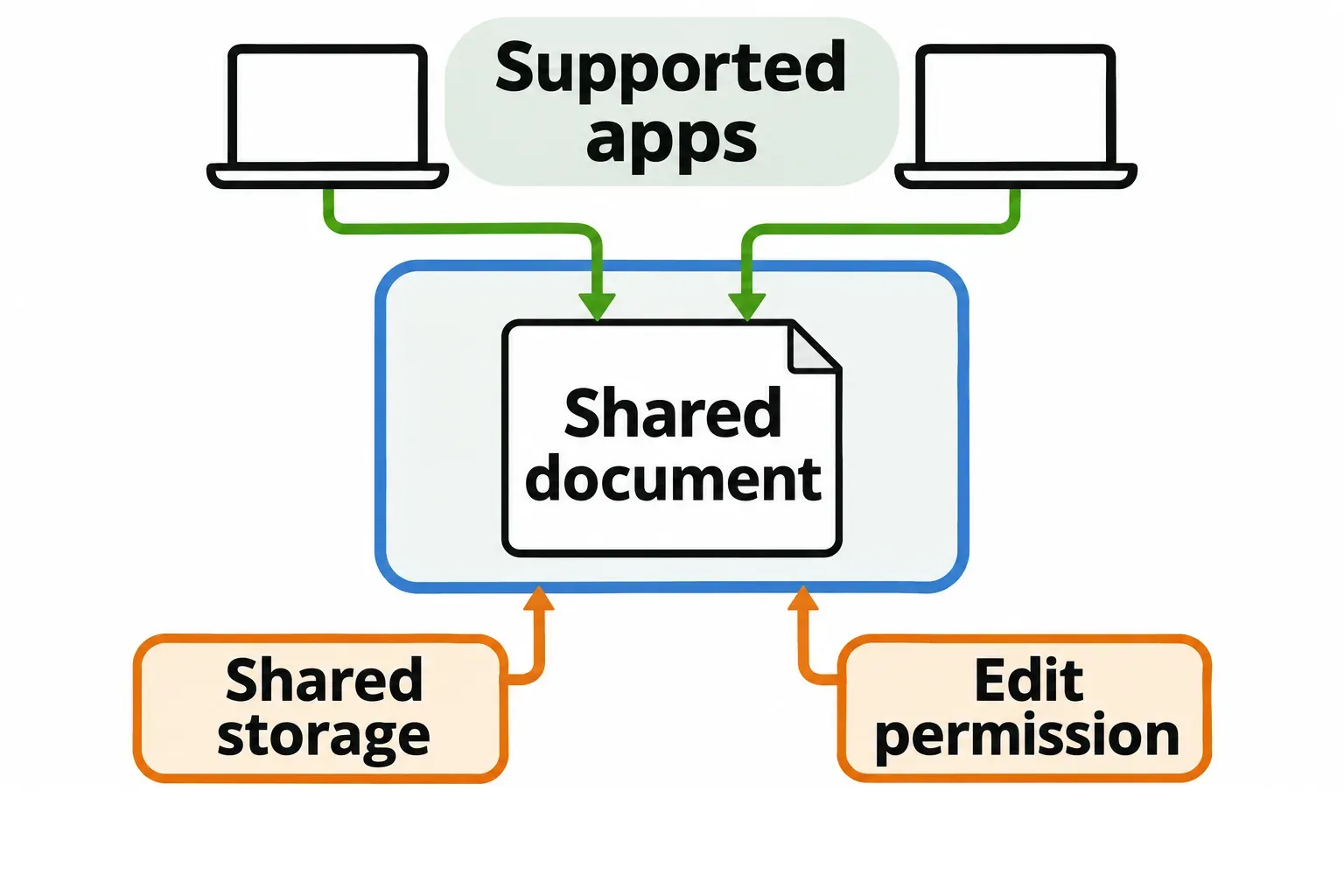
A shared folder alone does not establish that arrangement. TDF describes LibreOffice Online as a server component needing file access and authentication from other software. The desktop download is not a ready-made hosted editing service. If your team already works together in Microsoft documents, price and plan that service change separately from replacing the desktop app.
Desktop choice and a familiar interface
LibreOffice's desktop downloads cover Windows, macOS and Linux. Microsoft's desktop options on the cited purchase page are for PCs and Macs. For a Linux user, that makes LibreOffice a practical local editor; for browser work, consider the web app's particular limits and account requirements.
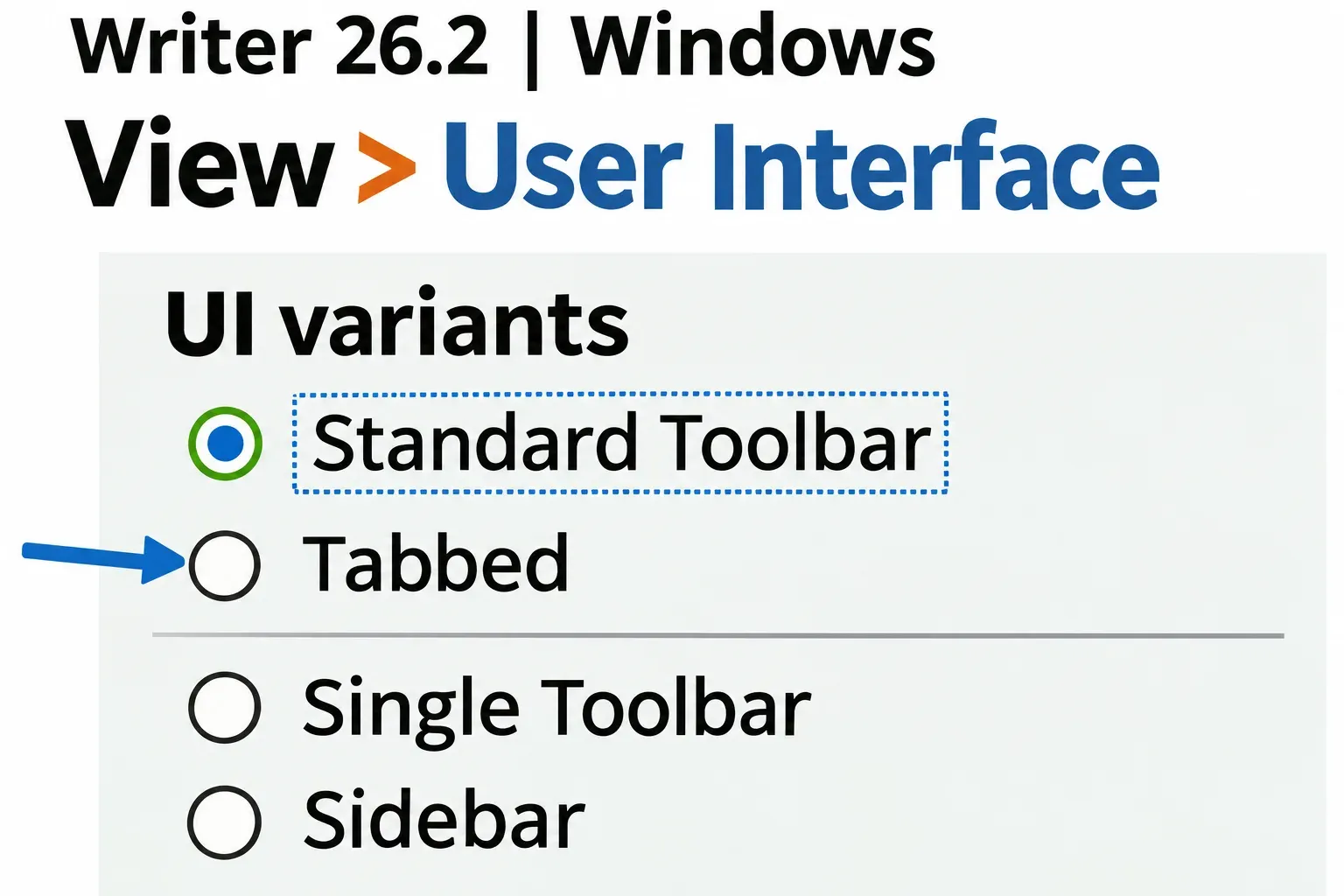
If the old toolbar arrangement is the obstacle, open a document in Writer and choose View > User Interface. Select Tabbed in the interface dialog and apply your choice. The current LibreOffice interface guide calls this the layout most similar to Microsoft's Ribbon. From an existing Tabbed layout, use the top-right menu and choose User Interface to return to the selector. You should see commands grouped into tabs; the familiar shape does not make LibreOffice's commands identical to Word's.
Keep both during the decision
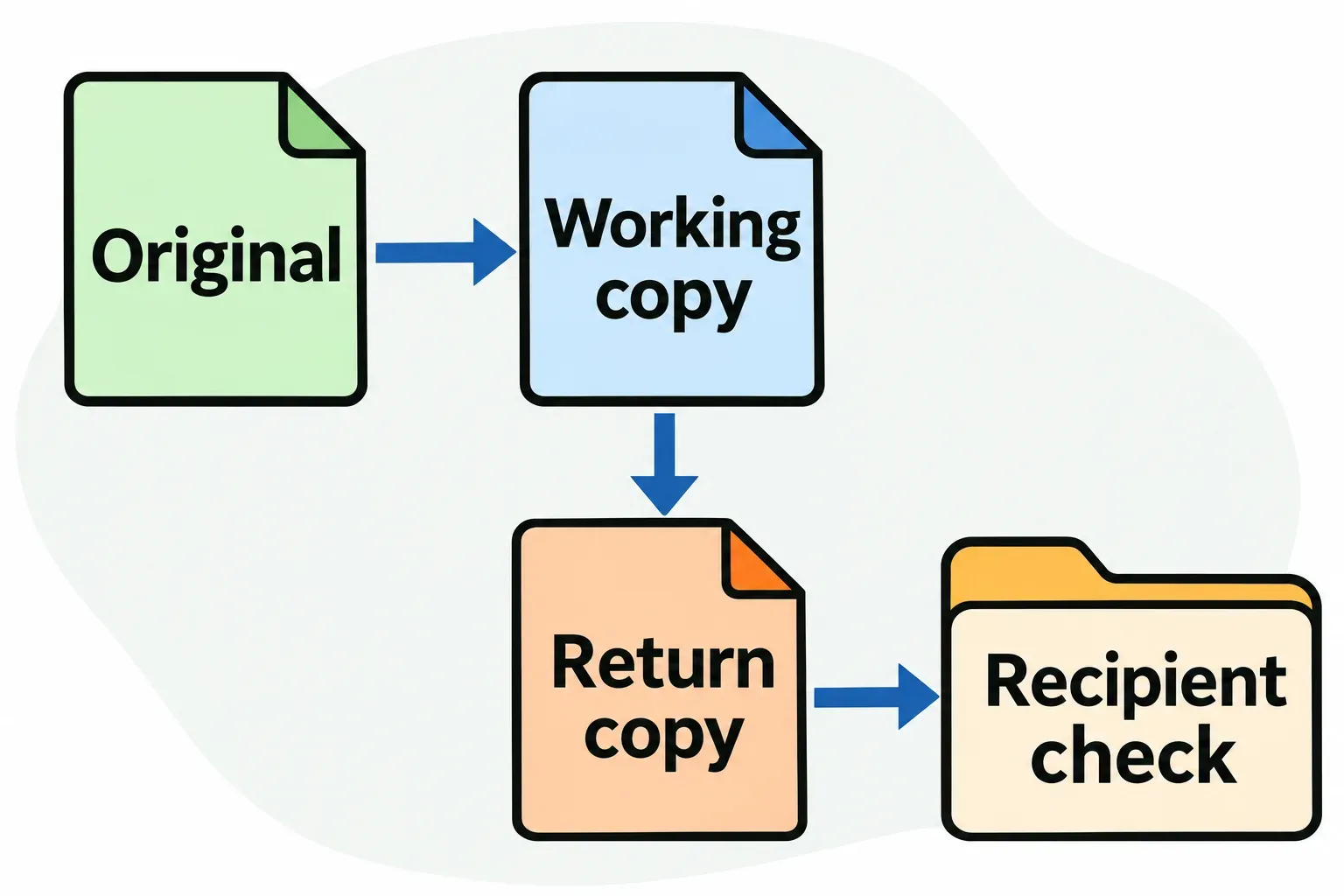
Before opening and saving anything important in another format, make separate working copies and retain the originals. Leave Microsoft Office available while you work through these checks:
- Choose files that represent your work. Include a document with its real styles and revisions, a workbook with its important calculations, and a presentation if you use one. A blank page cannot answer the compatibility question.
- Name the required outcome. Ask who edits next, which file type they require, whether they need revision history, and whether macros or add-ins are involved.
- Open each copy from LibreOffice with File > Open. Inspect the features that matter, then use File > Save As for a separately named return copy in the required format. Do not replace the untouched original.
- Have the recipient inspect that return copy in their editor. Check layout, revisions, calculated results and presentation behavior as applicable. A PDF can accompany an editable file to show the intended appearance, but it does not replace an editable return file when one is required.
Move the work whose requirements are satisfied. Keep Microsoft for a dependency that remains unresolved, rather than converting the whole archive to justify the switch.